WooCommerce Shipping Protection · HPOS · Blocks ready

Self-Hosted WooCommerce Shipping Protection Plugin

Let customers protect their orders at checkout, manage claims from your own dashboard, and keep 100% of every protection fee.

A shipping insurance alternative that runs entirely inside your WooCommerce store. Lost, damaged and stolen package claims are filed through a customer portal and resolved from your merchant dashboard in wp-admin — no third-party platform, no revenue share.

Free forever plan · No account required · Installs in 2 minutes

  • Checkout protection Customers opt into protection plans as a line item, in Blocks or classic checkout.
  • Claims management Lost, damaged and stolen claims filed in a customer portal, resolved from wp-admin.
  • You keep 100% Every protection fee lands in your account. No commission, no revenue share, ever.
wp-admin › CoverMyOrder
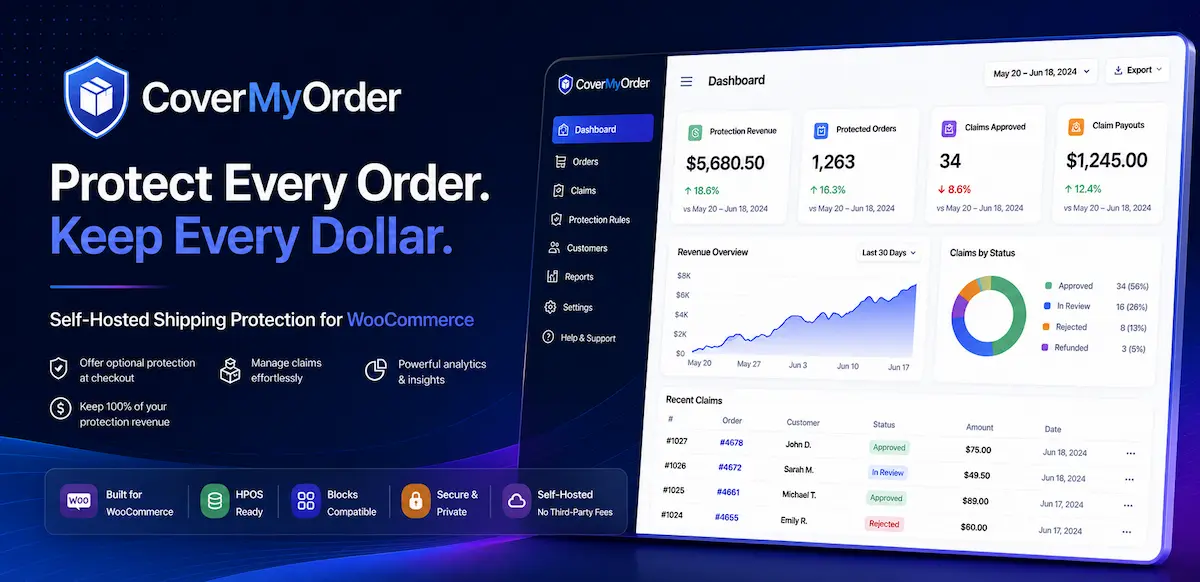
CoverMyOrder merchant dashboard in wp-admin showing shipping protection premiums collected, open claims and reserve balance
Native support for
  • WooCommerce
  • WordPress
  • HPOS
  • Cart & Checkout Blocks
WHY COVERMYORDER

A WooCommerce shipping protection program you actually own.

Self-hosted shipping protection means the plugin, the protection fees, the reserve ledger and every claim record live inside your own WooCommerce database — not on a vendor's platform. You set the protection plans, you decide the payouts, and you keep 100% of what customers pay.

Third-party order protection platforms such as Route and Seel run the program on your behalf and take a share of the premium in exchange. CoverMyOrder is the opposite trade: you carry the claims yourself, and you keep the margin.

Keep 100% of every protection fee

Each protected order adds a shipping protection premium that goes straight to your account through your existing gateway, not a vendor's. Across your order volume it compounds into a margin no revenue-share model would leave you.

See licensing

Fewer “where is my order?” tickets

Lost, damaged and stolen package claims go into a structured customer portal with photo evidence and an audit trail, instead of landing in your inbox as untracked support email.

Read the claims guide

Your reserve, your policy, your payouts

Protection fees collect in a reserve ledger you control from your merchant dashboard. You set the pricing model, the coverage caps and the approval rules, and you decide every payout.

How the reserve ledger works

Your customer data never leaves your store

Order records, claim submissions and evidence uploads are written to your own WordPress database. Nothing is synced to an external platform, so you stay the data controller for your own customers.

Read the privacy policy

Native to WooCommerce, not bolted on

Checkout protection renders in both the Cart & Checkout Blocks and the classic shortcode checkout, with no template overrides. Order data is read through the WooCommerce HPOS API rather than legacy post tables.

See the documentation

Routine claims resolve themselves

Premium adds a rule-based decisioning engine over incoming claims: auto-approve low-value claims, hold high-risk ones for manual review, and cap payouts per customer, so your team handles the exceptions only.

Explore automation rules

Self-hosted vs third-party protection platforms

  CoverMyOrder self-hosted Third-party platform hosted service
Who keeps the protection fee You keep 100% Platform takes a share
Where claim data lives Your WooCommerce database The vendor's platform
Who decides payouts You do, from wp-admin The vendor, by their policy
Pricing control You set fees and coverage caps Vendor or algorithm sets them
Who carries the claim cost You do, from your reserve The vendor absorbs it
Ongoing cost Flat licence, or free forever Per-order or revenue share

The honest trade-off: a hosted platform absorbs claim costs for you, and that has real value if your claim volume is unpredictable. Self-hosting means you carry those costs — and keep the margin when claims stay low.

CHECKOUT EXPERIENCE

Add shipping protection to WooCommerce checkout.

CoverMyOrder adds an opt-in shipping protection line item to the WooCommerce cart and checkout. It renders natively in both the Cart & Checkout Blocks and the classic shortcode checkout, inherits your theme's styling, and prices itself as a flat fee or a percentage of cart value — no template overrides and no code.

  • Blocks and classic checkout: one widget, both surfaces, no template overrides.
  • Opt-in or default-on: set the toggle's default state per store.
  • Flat fee or percentage pricing: with coverage caps and per-category overrides.
  • Branded protection badge: colours, copy and placement matched to your store, on product and cart pages.
  • Multiple protection plans: offer tiered coverage on Premium, or a single flat-fee plan on the free version.
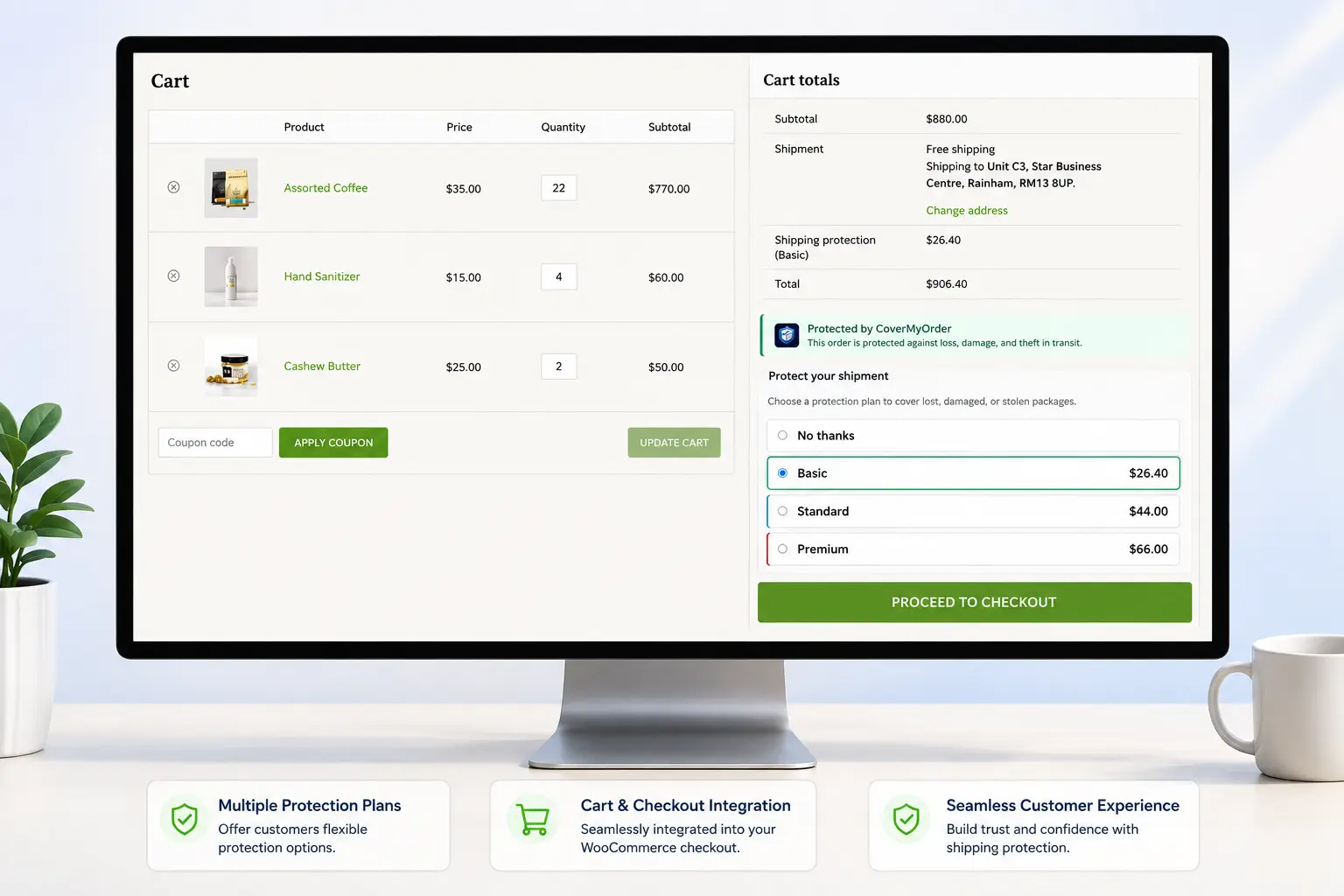
Opt-in shipping protection toggle shown as a line item in the WooCommerce Checkout Block, with a branded protection badge and the protection fee added to the cart total

How checkout protection works

  1. 1 Protection appears at checkout The shipping protection widget shows as a line item in the cart and checkout, priced by the protection plan you configured.
  2. 2 The customer opts in They toggle protection on, and the fee is added to the order total and collected through your existing payment gateway.
  3. 3 The order is covered The protection fee is recorded against the order with its plan and coverage cap, and logged to your reserve ledger — ready if a claim is ever filed.
MERCHANT DASHBOARD

Run the whole protection program from wp-admin.

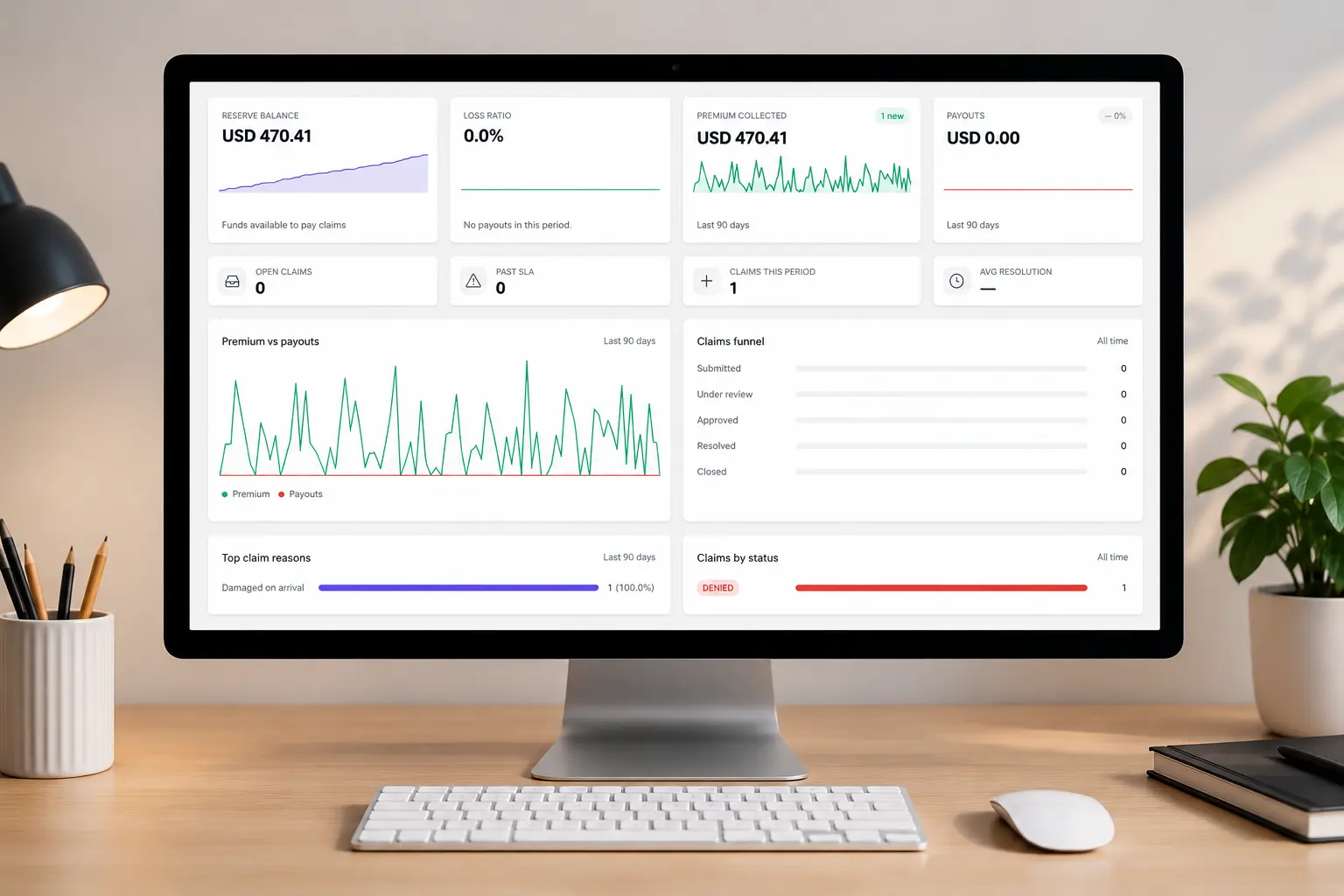
The CoverMyOrder merchant dashboard reports premiums collected, open claims, reserve balance and payout activity on a single wp-admin screen. It reads order data through the WooCommerce HPOS API, so there is no external login, no separate portal and no context switching between your store and a vendor's platform.

  • Live reserve and premium totals: KPIs, sparklines and loss ratio at a glance.
  • HPOS-compatible order data: built on WooCommerce's High Performance Order Storage, not legacy post tables.
  • Role-based access: give support staff claim access without handing over store admin.
  • Products driving your claims: see which items generate the most lost, damaged and stolen package claims.
  • Bulk claim actions: clear a backlog of routine claims without opening each one individually.
CoverMyOrder merchant dashboard in wp-admin showing shipping protection premiums collected, reserve balance, loss ratio and open claims by status

The numbers the dashboard tracks

A shipping protection program is only healthy if premiums outpace payouts. These are the figures that tell you whether yours is.

Premiums collected
The total protection fees customers have paid, across every protected order in the period.
Reserve balance
Premiums collected minus claims paid out — what you have set aside to cover future claims.
Loss ratio
Claim payouts as a percentage of premiums collected. The single clearest measure of program health.
Attach rate
The share of orders where the customer opted into protection at checkout.
Open claims
Claims submitted but not yet resolved, broken down by status so nothing sits unattended.
Payout activity
Every refund and reship issued against a claim, written to the reserve ledger as it happens.
CLAIMS MANAGEMENT

Resolve lost, damaged and stolen package claims in-house.

A shipping protection claim is a customer's request for a refund or replacement when an order does not arrive as expected. With CoverMyOrder, customers file claims from their WooCommerce account, upload photo evidence and track status. You review the claim in your merchant dashboard and approve a refund or a reship — and every action is written to the reserve ledger, so each order keeps a complete audit trail.

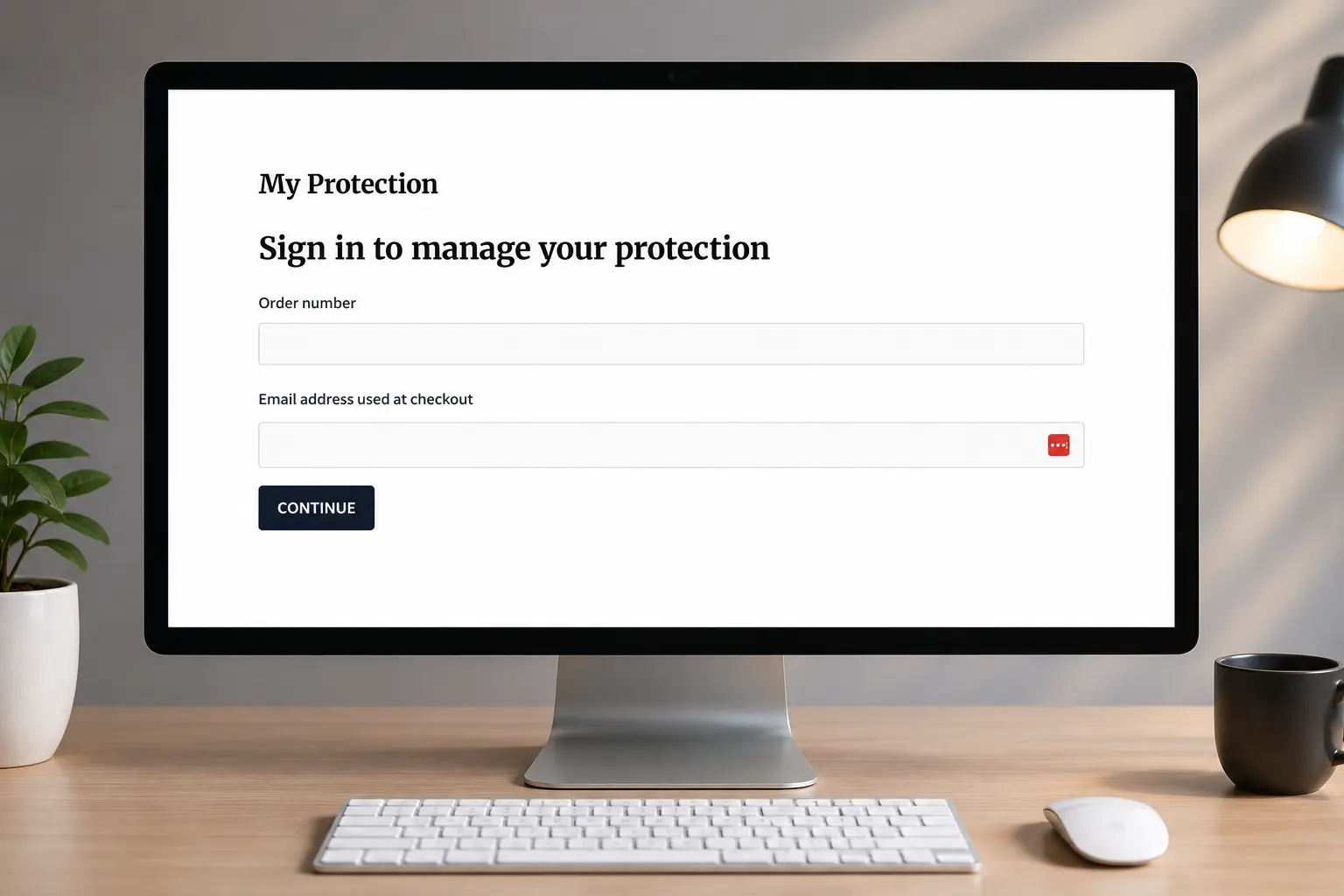
  • Self-serve claims portal: available in My Account, as a block, or via shortcode.
  • Photo evidence and notes: up to 10 files per claim, attached to the order record.
  • Refund or reship in one click: with rule-based auto-approval on Premium.
  • Carrier tracking in context: current delivery status sits beside the customer's account of what happened.
  • Customer risk profile: claim frequency and history surfaced before you approve a payout.
CoverMyOrder claims management screen in wp-admin showing a lost package claim with photo evidence, customer notes and carrier tracking status awaiting review

The three claim types, and what each one needs

Lost, damaged and stolen are handled differently — different evidence, different carrier position, different fraud risk. CoverMyOrder captures each as its own claim reason so you can price and review them separately.

Lost in transit

The package never reaches the customer. Tracking stalls mid-route, or shows delivered when nothing arrived.

Usually needs carrier tracking history and the customer's account of non-delivery.

Damaged on arrival

The package arrives, but the contents are broken, crushed or otherwise unusable on opening.

Usually needs photos of both the item and the outer packaging — the single fastest claim to resolve.

Stolen after delivery

Tracking confirms delivery, but the package is taken from the doorstep before the customer retrieves it — commonly called porch piracy.

Usually needs a customer statement, and sometimes doorbell footage or a police report. The highest fraud risk of the three.

Because each reason is recorded separately, your analytics show which type is actually driving your loss ratio — and your automation rules can auto-approve one type while holding another for review.

RESERVE & LEDGER

Every premium and payout, accounted for.

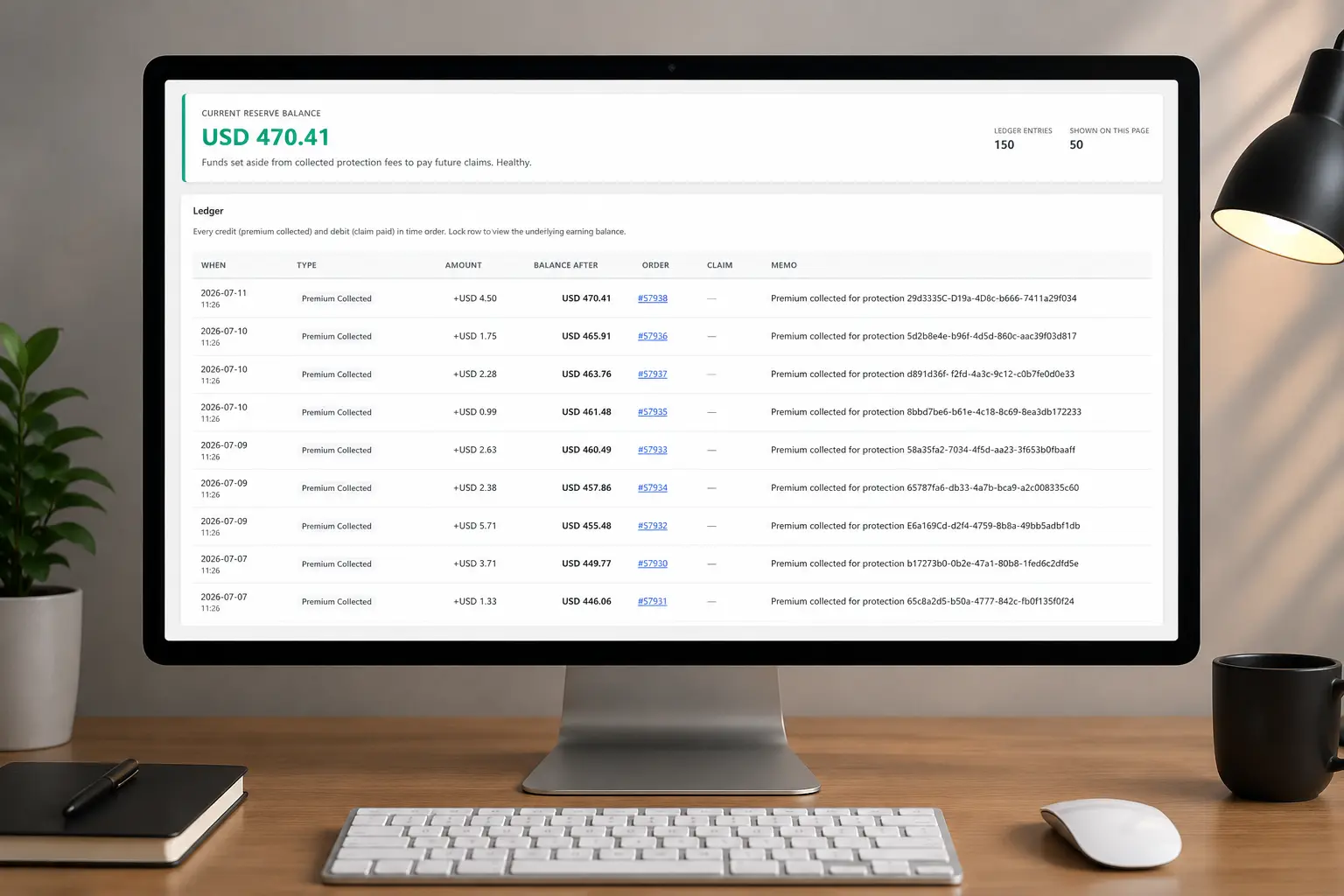
A reserve ledger is a running record of every shipping protection premium collected and every claim paid out, kept as individual transactions rather than a single aggregate balance. CoverMyOrder writes each one as its own line, giving you a balance you can defend to an accountant. Nothing is aggregated away, and every entry ties back to a WooCommerce order.

  • Immutable transaction history: entries are appended, never edited or overwritten.
  • Loss ratio and reserve health: see what you have collected against what you have paid.
  • CSV export for reconciliation: claims, protections and the full ledger, on Premium.
  • Order-level traceability: open any entry and land on the WooCommerce order that produced it.
  • Stored in your own database: the ledger lives in your WordPress install, not on a vendor's platform.
CoverMyOrder reserve ledger in wp-admin showing shipping protection premiums collected, claim payouts and a running reserve balance tied to WooCommerce orders

What the ledger actually records

Two entry types, one running balance. Premiums are credited when a protected order is placed; payouts are debited when you approve a claim. Neither is ever edited after the fact — a correction is a new entry, not a rewrite.

Illustrative reserve ledger entries
Order Entry type Amount Reserve balance
#1042 Premium collected + 4.99 128.44
#1043 Premium collected + 6.50 134.94
#1019 Claim payout — damaged − 62.00 72.94
#1044 Premium collected + 4.99 77.93
Why append-only matters

An editable balance is a number someone has to trust. An append-only ledger is a history anyone can re-derive — which is the difference between a figure your accountant accepts and one they have to question.

Reading reserve health

A reserve that keeps climbing means premiums are outpacing claims. One that trends down means your pricing or coverage caps need revisiting — visible long before it becomes a problem.

Figures shown are illustrative. The reserve ledger is a bookkeeping record inside your own store — it is not a segregated trust account, an insurance reserve, or a financial guarantee.

AUTOMATION RULES

Let the routine claims resolve themselves.

Claims auto-decisioning is a set of rules that approve, deny or hold an incoming claim automatically, based on conditions you define. CoverMyOrder Premium runs a rule-based decisioning engine over every claim: low-value claims clear without an operator, high-risk ones are held for manual review, and payouts are capped per customer — so your support team handles the exceptions rather than every claim.

  • Threshold-based auto-approval: claims under your value limit clear without an operator.
  • Fraud and abuse flags: risk scoring on geography and seasonal signals, plus a customer risk profile.
  • Per-customer payout caps: limit how much any one account can claim in a period.
  • Claims filed from carrier tracking: when tracking reports a shipment lost or damaged, the claim opens itself.
  • Carrier recovery records: approving a claim opens a FedEx, UPS or USPS recovery record so you can pursue the carrier.
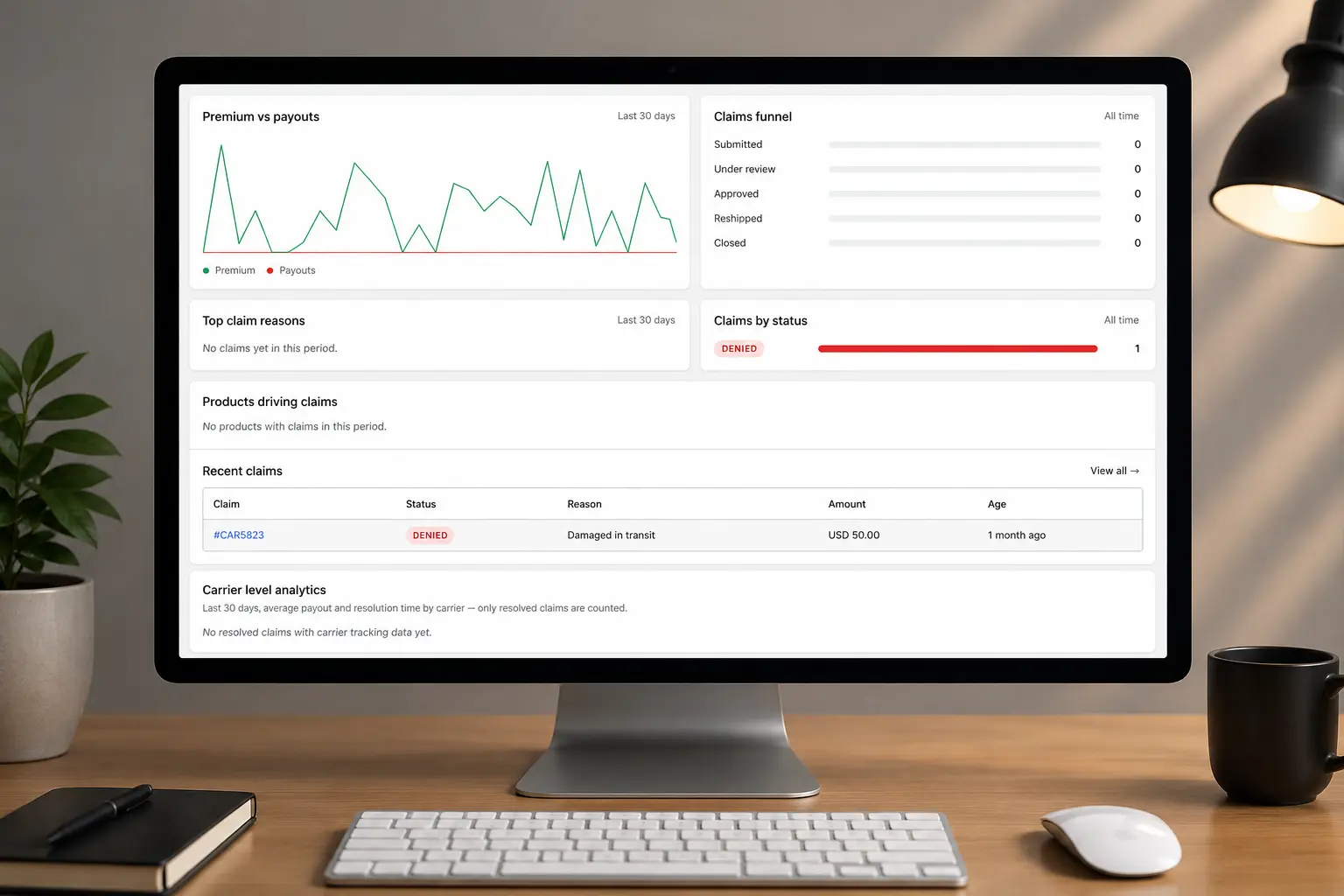
CoverMyOrder automation rules and claims analytics screen showing premiums versus payouts, a claims funnel, auto-approval rules and recent claims by status

What a rule looks like

Each rule is a set of conditions and the action to take when they all match. Claims are evaluated as they arrive, and anything that matches no rule waits for you.

IF claim value is under your threshold
AND customer risk profile is clean
Auto-approve the refund

The routine majority. These are the claims that would otherwise eat your support hours for no judgement value.

IF claim reason is stolen after delivery
AND this customer has claimed recently
Hold for manual review

Stolen claims carry the highest fraud risk, and repeat claimants are the pattern worth a human look.

IF customer payouts exceed your period cap
AND no override is set on the account
Auto-deny with a reason

Caps stop a single account from draining the reserve, and the customer gets a clear reason rather than silence.

Automation you can switch off

No claim is ever decided automatically until you write a rule that says so. Run the plugin with zero rules and every claim waits for manual review, exactly as it does on the free version — then automate one claim type at a time as you learn your own patterns. Every automated decision is still written to the reserve ledger with the rule that triggered it.

Rules shown are illustrative examples of the conditions and actions available. Configure your own thresholds, claim reasons and caps in wp-admin.

BADGE CUSTOMIZATION

Trust badges that match your brand.

The shipping protection badge is what customers see before they opt in — so it should look like your store, not a third-party widget. Set its colours, copy and placement across product and cart pages, without touching a template file.

  • 7 colour presets + custom hex
  • Your own logo
  • Per-surface placement
  • White-label on Premium
Badge setup guide
Branded shipping protection badge and plan selector shown in the WooCommerce cart totals, matched to the store's colours
ANALYTICS

Know your protection margin.

Protection margin is what is left after claims are paid. Track attach rate, premiums against payouts and loss ratio over time, and see which products are driving your claims — so you can adjust pricing and coverage caps before the reserve tells you to.

  • Attach rate
  • Loss ratio over time
  • Claims funnel by status
  • Products driving claims
Every analytics report
CoverMyOrder analytics showing reserve balance, loss ratio, shipping protection premiums collected and the claims funnel by status
FREE VS PRO

One plugin. Pro unlocks the whole platform.

The free version of CoverMyOrder is a complete shipping protection program: checkout widget, claims portal, reserve ledger and analytics. Pro adds pricing flexibility, claim automation, white-label branding and integrations for stores running at scale.

Feature Free Pro
Plans & pricing
Protection plans Single flat-fee plan Unlimited active plans (Basic / Standard / Premium tiers)
Pricing model Flat fee only + Percentage-of-cart pricing
Coverage cap Fixed cap only + Multiplier, cart-total, and global store-wide caps
Category pricing Per-category price overrides (e.g. charge more for electronics)
Fallback plan Configurable fallback when a checkout's plan id no longer resolves
Checkout & branding
Checkout widget Cart / Checkout Block + classic shortcode Same
Badge branding 2 colour presets, fixed title and description, always on 7 presets + custom hex, custom logo, editable copy, per-surface placement, can hide entirely
White-label Custom agency name in admin menu, email footers, and customer portal
Claims & resolution
Claims portal Self-serve (My Account, block, shortcode) Same
Evidence upload 10 files at 10MB each by default (filterable) Same limits in practice
Carrier tracking Manual entry + AfterShip inbound webhook ingestion + Auto-files claims when tracking shows lost or damaged, with no operator action
Claims resolution Refund only + Reship as an alternative
Auto-decisioning Rule-based auto-approve / auto-deny engine, unlimited rules
Fraud & risk Basic customer risk profile sidebar + Rule-based fraud scoring (geography + seasonal signals)
Carrier recovery Opens a FedEx / UPS / USPS recovery record when a claim is approved
Analytics & ledger
Analytics KPIs, sparklines, loss ratio, bulk actions, products driving claims report + Carrier-level analytics and loss-ratio / payout reporting
Reserve ledger Full running balance Same, plus CSV export
CSV export Claims, protections, and reserve ledger
Integrations & platform
Notifications Email (every claim status) + SMS via Twilio
Outbound webhooks Slack / Zapier / custom, HMAC-signed
REST API Read-only endpoints + API tokens for authenticated external / integrator write access
Multi-store Manage claims across multiple connected stores from one dashboard
WP dashboard widget Yes Same
Support
Support Community / WordPress.org forum Priority email support

“Same” = identical to the Free capability · “—” = Pro only

THE DIFFERENCE

Why CoverMyOrder?

Third-party protection platforms run the programme for you and take a share of every fee. CoverMyOrder runs it inside your own store, so the margin, the branding and the decisions stay yours.

CoverMyOrder Self-hosted plugin
Third-party platform Hosted service
Protection fees
You keep 100%
Revenue share on every fee
Where it runs
Your WooCommerce store
The vendor's platform
Branding at checkout
Yours — colours, copy, logo
The vendor's badge and name
Claim decisions
You decide every one
The vendor, by their policy
Pricing control
You set fees and caps
Vendor or algorithm sets them
Claim data
Your own database
Held on the vendor's platform
What you pay
Flat annual licence — or free forever
A percentage of every order, forever
Who funds payouts
You do, from your reserve
The vendor absorbs the cost

That last row is the real trade-off, and it is worth being clear about: a hosted platform carries your claim costs, and that has genuine value if your claim volume is unpredictable. Self-hosting means you carry them — and keep the margin when claims stay low. Most stores find the maths favours keeping it, which is why the free version exists: run it, watch your loss ratio, decide with your own numbers.

PRICING

Simple licensing for every store size.

Every paid plan includes the full CoverMyOrder feature set — there are no feature-gated tiers. Choose how many sites you need to cover and how you would like to pay.

SILVER

For solo merchants running a single WooCommerce store.

Normally $7.99 / mo
$6.67 / mo
Billed annually
Single site
$79.99 billed once a year
Start free trial
  • Unlimited protected orders / month
  • Unlimited active plans
  • Percentage pricing + flat fees
  • Replacement + fixed-cap coverage
  • All 7 colour themes + custom hex picker
  • Customer risk profile (fraud detection)
  • Bulk claim actions
  • Reship workflow
  • Auto-decisioning rule engine
  • Webhooks (Slack / Zapier / custom)SOON
  • White-label support
MOST POPULAR

BUSINESS

Perfect for growing WooCommerce stores managing multiple sites.

Normally $29.99 / mo
$16.58 / mo
Billed annually
10 sites
$199 billed once a year
Buy Business
  • Unlimited protected orders / month
  • Unlimited active plans
  • Percentage pricing + flat fees
  • Replacement + fixed-cap coverage
  • All 7 colour themes + custom hex picker
  • Customer risk profile (fraud detection)
  • Bulk claim actions
  • Reship workflow
  • Auto-decisioning rule engine
  • Webhooks (Slack / Zapier / custom)SOON
  • White-label support

AGENCY

Built for Woo agencies deploying CoverMyOrder for clients.

Normally $49.99 / mo
$40.00 / mo
Billed annually
1000 sites
$479.99 billed once a year
Buy Agency
  • Unlimited protected orders / month
  • Unlimited active plans
  • Percentage pricing + flat fees
  • Replacement + fixed-cap coverage
  • All 7 colour themes + custom hex picker
  • Customer risk profile (fraud detection)
  • Bulk claim actions
  • Reship workflow
  • Auto-decisioning rule engine
  • Webhooks (Slack / Zapier / custom)SOON
  • White-label support
Just exploring? The core plugin is free. Download free on WordPress.org

Prices in USD · 14-days money-back guarantee · Secure checkout by Freemius

CUSTOMER STORIES

Built for stores that take shipping seriously.

  • CoverMyOrder was live in our WooCommerce checkout in less than ten minutes. Customers immediately understood the shipping protection option, and managing claims became much easier for our support team.
    Sarah Mitchell Store Owner, Urban Threads Co.
  • We wanted to stop paying commissions to third-party shipping protection providers. CoverMyOrder lets us keep control while offering customers the same confidence during checkout.
    Michael Carter Founder, Gadget Haven
  • Our accountant loves how every protection fee and claim stays organized inside WooCommerce. Reconciling monthly reports is now much simpler than our previous workflow.
    Emma Rodriguez Operations Manager, Bloom & Birch
  • Before installing CoverMyOrder, our inbox filled with damaged shipment emails every week. Now customers can submit claims through a structured process, saving our team hours.
    Daniel Kim Owner, Peak Outdoor Supply
  • The automation rules are surprisingly powerful. Routine claims are processed quickly while exceptional cases still receive manual attention. It has significantly reduced our workload.
    Olivia Thompson Director, Luxe Home Studio
  • We manage several WooCommerce stores for clients, and CoverMyOrder has become our standard recommendation. It's lightweight, professional, and easy to deploy across multiple websites.
    James Walker Agency Owner, Bright Commerce Studio
  • Switching from a third-party protection platform was easier than expected. We now own the customer experience from checkout to claim resolution without paying unnecessary commissions.
    Sophia Green Founder, Pure Organics Market
  • Installation took only a few minutes. The interface feels native to WooCommerce, and our team required almost no training before using it.
    Ethan Brooks Owner, Nova Electronics
  • Customers appreciate having a clear shipping protection option before completing their purchase. It builds trust without making checkout feel complicated.
    Chloe Bennett Store Owner, Willow & Stone Boutique
  • One of the biggest advantages is that everything stays inside our own WooCommerce database. We maintain full ownership of our data and customer claims from start to finish.
    Ryan Foster Founder, Next Level Gear
  • Replace with a real customer quote. This slot suits a quote about support quality or the WordPress.org community response.
    Reviewer name Role, Store name
FAQ

Questions, answered.

What is WooCommerce shipping protection?

WooCommerce shipping protection is an optional fee a customer pays at checkout, in exchange for the store refunding or replacing their order if it is lost, damaged or stolen in transit. CoverMyOrder adds that option as a line item in your WooCommerce cart and checkout, and gives you the tools to manage the resulting claims.

How does CoverMyOrder work?

In three steps. A protection option appears at checkout and the customer opts in, paying a fee you set. That fee is recorded in your reserve ledger. If the order goes wrong, the customer files a claim from their account, and you approve a refund or a reship from wp-admin. Everything runs inside your own WordPress install.

Is shipping protection the same as shipping insurance?

No. Shipping insurance is an underwritten policy sold by a licensed insurer. Shipping protection is a promise you make directly to your own customers: they pay a fee, and you agree to refund or reship if the order does not arrive as expected. CoverMyOrder is software that runs that program for you. It is not an insurer, does not underwrite anything, and is not a substitute for legal or regulatory advice in your market.

Does CoverMyOrder take a percentage of my premiums?

No. CoverMyOrder takes 0% of your shipping protection premiums. It is a plugin installed on your own WooCommerce store, not a third-party platform, so every premium a customer pays goes to you. The only cost is a flat annual licence fee for Premium.

Can I set my own protection fees?

Yes. You control the pricing model entirely. The free version offers a single flat-fee plan. Premium adds percentage-of-cart pricing, multiple protection plans, coverage caps, and per-category overrides so you can charge differently for fragile or high-value products. No algorithm sets your fees for you.

Where does the protection money actually go?

Premiums are collected as a normal line item through your existing payment gateway, so the money lands in your account alongside the order total. CoverMyOrder then tracks every premium and every payout in a dedicated reserve ledger, so you always know how much is set aside to cover claims.

What kinds of claims can customers file?

Three types, each recorded separately. Lost in transit, where the package never arrives. Damaged on arrival, where it arrives but the contents are broken. And stolen after delivery, where tracking confirms delivery but the package is taken before the customer retrieves it. Recording them separately lets you see which type is driving your claims.

What happens when a customer files a claim?

The customer submits a claim from their account portal with photos and notes. You review the evidence in wp-admin and approve a refund or a reship, and every action is written to the reserve ledger automatically. Premium adds rule-based automation that resolves routine claims without an operator.

Who handles and pays for customer claims?

You do. That is the trade-off of running your own program: you review every claim and you fund every payout from the premiums you have collected. A third-party platform absorbs those costs but takes a share of the revenue. CoverMyOrder gives you the margin and the control, and the responsibility that comes with them.

Is it compatible with the WooCommerce Blocks checkout and HPOS?

Yes. CoverMyOrder supports both the Blocks checkout and the classic shortcode checkout, and is fully compatible with High Performance Order Storage (HPOS). All order operations use the WooCommerce HPOS API rather than the legacy post tables.

Can I try it before buying Premium?

Yes. The free plugin on WordPress.org includes the full checkout experience, the claims portal, and the reserve ledger — it is a complete protection program, not a trial. Upgrade to Premium when you want automation rules, percentage pricing, advanced analytics, and priority support.

Do I need a separate account or external service?

No. Everything runs inside your WordPress install. There is no external account to create, no order or claim data leaving your store, and no monthly platform fee. Your protection data lives in your own database and stays there, even if you stop paying for Premium.

What is the refund policy on a Premium licence?

Premium licences carry a 14-day money-back guarantee. Request a refund within 14 days of purchase and it is processed without a support ticket. Note that this covers the licence fee only — it is separate from the claim refunds you issue to your own customers, which come from your reserve.

Turn shipping risk into recurring revenue.

Install the free CoverMyOrder plugin on your WooCommerce store in a couple of minutes. Upgrade to Premium whenever you are ready to automate claims.

  • Free forever plan
  • No account required
  • 14-day money-back guarantee