
WooCommerce shipping protection is an opt-in fee added to the cart or checkout that covers a customer’s order against loss, damage or theft during transit. The merchant collects the fee through their existing payment gateway and uses it to fund refunds or replacements when a claim is filed. It runs as a plugin inside WooCommerce, with no external platform required.
Every WooCommerce store that ships physical products carries delivery risk. Packages go missing in transit, arrive damaged, or get stolen from doorsteps after the carrier marks them delivered. When that happens, the merchant absorbs the cost, either by issuing a refund, reshipping the order, or losing the customer entirely.
Shipping protection turns that risk into a structured programme. Instead of absorbing losses as one-off support costs, the store offers customers the option to protect their order at checkout for a small fee. That fee funds a reserve the merchant draws from when claims arise. The result is a system where delivery problems are handled through a defined process rather than ad hoc inbox decisions.
This guide covers how WooCommerce shipping protection works, the difference between self-hosted and third-party models, how to price it, how to manage claims, and how to choose the right approach for your store.
Table of Contents
What is WooCommerce shipping protection?
WooCommerce shipping protection is a checkout add-on that lets customers pay a small fee to cover their order against lost, damaged or stolen packages. The fee appears as a line item in the cart, is collected through the store’s payment gateway, and funds a reserve the merchant uses to resolve claims. It is not insurance and is not underwritten by a licensed insurer.
The concept is straightforward. A protection option appears in the WooCommerce cart or checkout, typically as an opt-in toggle or a selectable plan. When the customer enables it, a fee is added to the order total. If the order is lost in transit, arrives damaged, or is stolen after delivery, the customer files a claim. The merchant reviews the claim and approves a refund or replacement, funded by the fees collected across all protected orders.
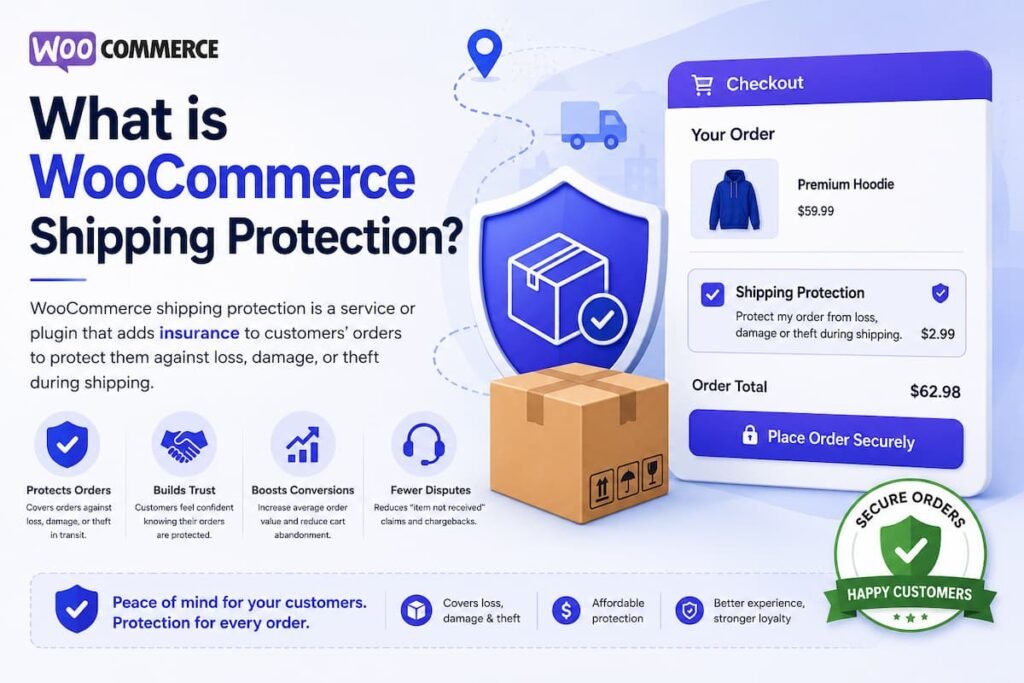
The protection fee is not forwarded to an insurer. It stays with the merchant. This is what distinguishes shipping protection from shipping insurance: insurance is an underwritten policy issued by a licensed carrier or insurer, while protection is a promise the merchant makes directly, backed by the fees they collect. The distinction matters legally, and several recent lawsuits in the United States have turned on whether platforms were selling insurance without a licence.
WooCommerce shipping protection plugins handle the mechanics: rendering the opt-in at checkout, recording the fee against the order, providing a claims portal for customers, and tracking premiums and payouts in a reserve ledger so the merchant can monitor programme health.
How does WooCommerce shipping protection work?
WooCommerce shipping protection works in three stages: a protection offer appears at checkout as a line item, the customer opts in and the fee is collected through the store’s existing payment gateway, and if the order is lost, damaged or stolen, the customer files a claim through a portal and the merchant approves a refund or reship from the collected reserve.
Stage 1: Protection appears at checkout
A shipping protection plugin adds a widget to the WooCommerce cart and checkout. This widget renders in both the Cart and Checkout Blocks and the classic shortcode checkout, depending on the plugin. The customer sees a toggle, a badge, or a plan selector that explains what the protection covers and what it costs. The fee can be a flat amount or a percentage of the cart value, depending on how the merchant configures it.
Stage 2: The customer opts in and the fee is collected
When the customer enables protection, the fee is added as a line item to the order total. It passes through the store’s existing payment gateway alongside the product prices, shipping charges and taxes. The plugin records the protection plan, the fee amount and the coverage cap against the order in the WooCommerce database. On a self-hosted plugin, this data is stored in the merchant’s own WordPress database. On a third-party platform, it is sent to the provider’s system.
Stage 3: A claim is filed and resolved
If something goes wrong with the delivery, the customer files a claim. Depending on the plugin, this happens through a self-serve portal in the customer’s WooCommerce account, a standalone page, or a shortcode-embedded form. The customer selects a claim reason (lost in transit, damaged on arrival, or stolen after delivery), uploads photo evidence if required, and submits.
The merchant reviews the claim in their WordPress dashboard. They see the order details, the tracking status, the evidence submitted, and the customer’s claim history. They then approve a refund or a replacement, and the payout is deducted from the reserve ledger. Some plugins offer automation rules that auto-approve low-value claims or hold high-risk claims for manual review.
Self-hosted vs third-party shipping protection: which model fits your store?
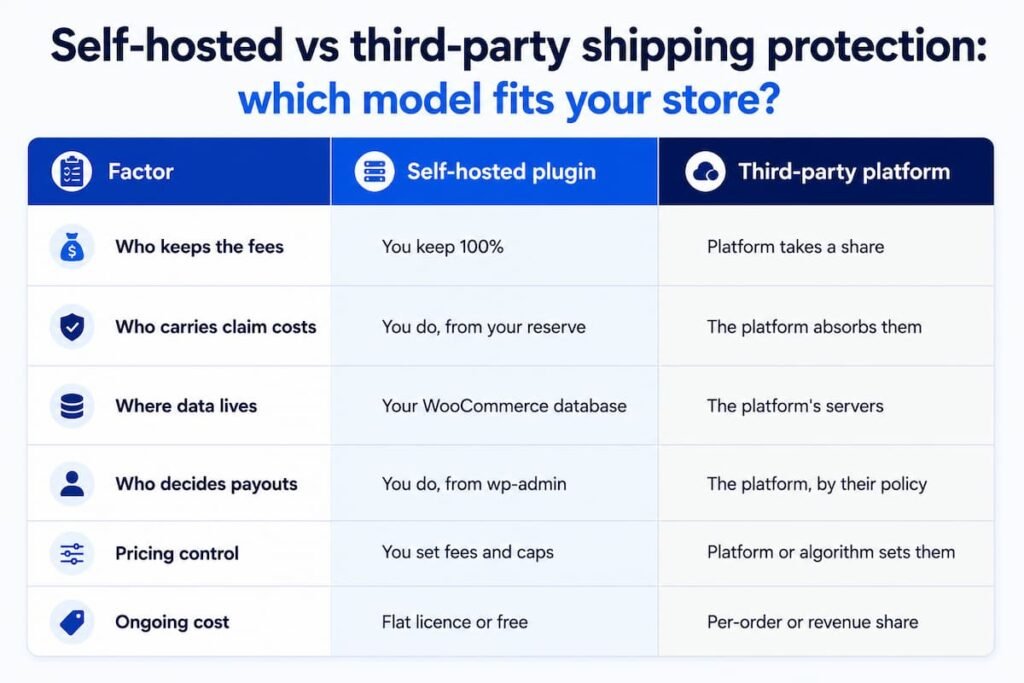
Self-hosted WooCommerce shipping protection means the plugin, the fees, the claims and the data all live inside your own WordPress database. You keep 100% of the protection fees and carry the claim costs yourself. Third-party platforms like Route run the programme on your behalf, absorb the claim costs, and take a share of the fees or charge per order in exchange.
This is the most important decision a WooCommerce merchant makes when setting up a shipping protection programme. The two models have fundamentally different economics, and which one is right depends on the store’s order volume, claim rate, and appetite for risk.
| Factor | Self-hosted plugin | Third-party platform |
| Who keeps the fees | You keep 100% | Platform takes a share |
| Who carries claim costs | You do, from your reserve | The platform absorbs them |
| Where data lives | Your WooCommerce database | The platform’s servers |
| Who decides payouts | You do, from wp-admin | The platform, by their policy |
| Pricing control | You set fees and caps | Platform or algorithm sets them |
| Ongoing cost | Flat licence or free | Per-order or revenue share |
The self-hosted model works best for stores with predictable claim rates and enough volume that the protection fees comfortably outpace payouts. Industry data suggests claim rates typically run between 5% and 8% of protected orders, with average payouts in the range of $35 to $45 per claim. For a store processing several hundred orders a month, the maths usually favours keeping the margin.
The third-party model works best for stores with unpredictable claim volumes, very high-value goods, or limited operational capacity to review claims. The platform absorbs the financial risk, which has real value, but it comes at the cost of margin, data ownership and pricing control.
On the WooCommerce side, self-hosted options include CoverMyOrder and ShippingGuard, both available on WordPress.org. Third-party platforms such as Route and Seel are more common on Shopify and have limited or no WooCommerce integration, which makes self-hosted plugins the default choice for most WooCommerce merchants.
Why should a WooCommerce store offer shipping protection?
WooCommerce stores should offer shipping protection because it turns delivery risk into a structured revenue stream, reduces untracked support costs from lost and damaged package enquiries, and builds customer trust at checkout.
Industry data shows 3 to 4% of packages arrive damaged and an estimated 119 million packages were stolen from doorsteps in the United States in 2024 alone.
It creates a new revenue stream with no additional inventory
Protection fees are collected on every opt-in order. Because claim rates typically stay well below the total premiums collected, the difference is retained as margin. Unlike a product upsell, the protection fee does not require additional inventory, manufacturing, or fulfilment. It monetises a concern the customer already has.
It reduces support costs from delivery enquiries
Lost, damaged and stolen package enquiries are among the most expensive support tickets an ecommerce store handles. They arrive as unstructured emails, require manual investigation, and often result in a goodwill refund with no audit trail. A structured claims portal channels these enquiries into a defined workflow with evidence uploads, tracking data and a resolution path, reducing the time and cost per case.
It builds trust at checkout and reduces cart abandonment
Customers buying high-value, fragile, or gift items often hesitate at checkout because they are concerned about delivery. A visible protection option signals that the store has a plan for when things go wrong. According to the 2025 State of Shipping Report by Shippo, 62% of online shoppers now expect the option to protect their package at checkout.
It gives the merchant data on delivery risk
Running a protection programme produces data that would otherwise be invisible: which products generate the most claims, which carriers lose the most packages, what the store’s actual loss ratio is, and whether pricing is adequate. This data informs packaging improvements, carrier selection, and pricing adjustments that reduce losses over time.
What types of claims does WooCommerce shipping protection cover?
WooCommerce shipping protection covers three claim types: lost in transit (the package never arrives or tracking stalls mid-route), damaged on arrival (the contents are broken or unusable when the package is opened), and stolen after delivery (tracking confirms delivery but the package is taken before the customer retrieves it, commonly called porch piracy).
Lost in transit
A lost-in-transit claim is filed when the package never reaches the customer. Tracking may show the shipment stalled at a distribution centre, or the carrier may have no scan data after a certain point. The evidence required is typically the tracking history and the customer’s statement of non-delivery. Lost claims are the most straightforward to verify because the tracking record either supports the claim or does not.
Damaged on arrival
A damaged-on-arrival claim is filed when the package arrives but the contents are broken, crushed, or otherwise unusable. The evidence required is photos of both the item and the outer packaging. Damaged claims are typically the fastest to resolve because the visual evidence is usually conclusive. For stores shipping fragile goods like ceramics, glassware or electronics, damaged claims tend to be the dominant claim type.
Stolen after delivery
A stolen-after-delivery claim is filed when the carrier’s tracking confirms delivery but the package is taken from the doorstep before the customer retrieves it. This is the claim type with the highest fraud risk, because the tracking record shows a successful delivery.
Evidence may include a customer statement, doorbell camera footage, or a police report. Per the Security.org 2025 Package Theft Report, an estimated 119 million packages were stolen from American homes in 2024.
Recording each claim type separately is essential because it allows the merchant to see which type is driving their loss ratio, price protection accordingly, and apply different automation rules to different claim reasons.
How to set up shipping protection in WooCommerce
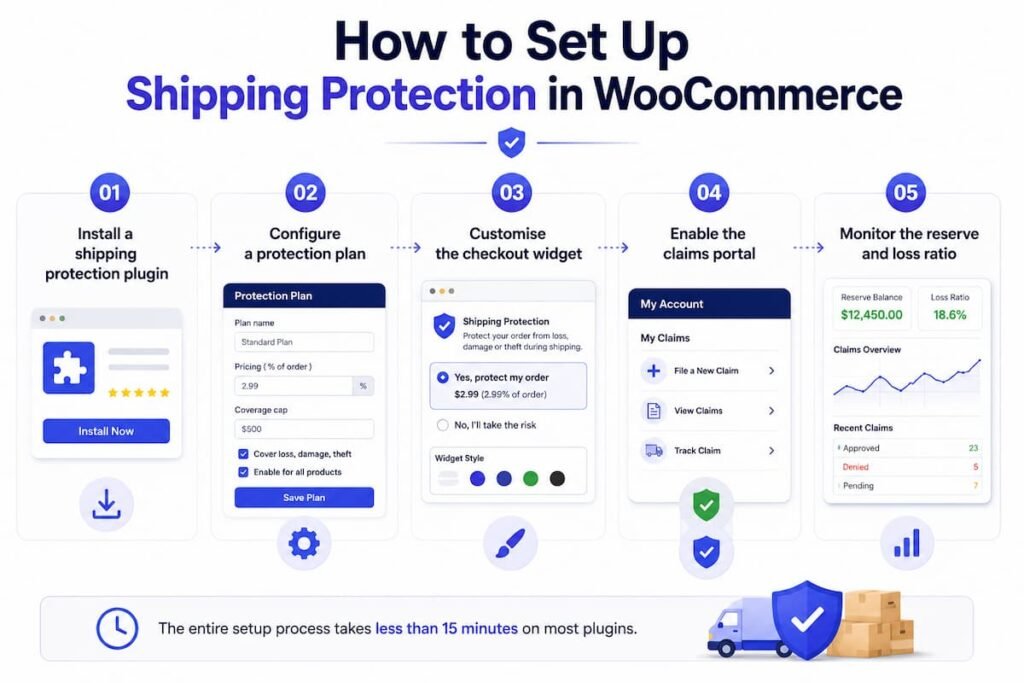
Setting up WooCommerce shipping protection involves installing a shipping protection plugin, configuring a protection plan with pricing and coverage caps, customising the checkout widget to match the store’s branding, and enabling the claims portal so customers can file claims from their account. The process takes less than 15 minutes on most plugins.
Step 1: Install a shipping protection plugin
Go to Plugins in your WordPress dashboard and search for a WooCommerce shipping protection plugin. Options include CoverMyOrder (self-hosted, free and premium tiers), ShippingGuard, and Ship-Safely. Install and activate the plugin. Confirm that the plugin is compatible with your checkout type (Cart and Checkout Blocks or classic shortcode) and with WooCommerce High Performance Order Storage (HPOS) if your store has HPOS enabled.
Step 2: Configure a protection plan
In the plugin’s settings, create a protection plan. Set the pricing model (flat fee or percentage of cart value), the fee amount, and the coverage cap (the maximum the store will pay out per claim). For stores new to protection, a flat fee of $1.99 to $4.99 is a common starting point. Percentage-based pricing (typically 1% to 3% of cart value) works better for stores with a wide range of order values.
Step 3: Customise the checkout widget
Configure the protection widget’s appearance: badge colour, description text, and whether protection is opt-in (customer toggles it on) or default-on (customer toggles it off). Match the widget’s styling to the store’s brand so it looks like a native part of the checkout, not a third-party add-on.
Step 4: Enable the claims portal
Activate the customer-facing claims portal. Most plugins offer this as a section within the WooCommerce My Account page, as a standalone block, or via a shortcode. The portal should allow customers to select a claim reason, upload photo evidence, and track claim status. Test the full flow by placing a test order with protection enabled and filing a claim against it.
Step 5: Monitor the reserve and loss ratio
Once the programme is live, monitor two numbers: the reserve balance (premiums collected minus claims paid) and the loss ratio (claim payouts as a percentage of premiums collected). A healthy programme has a loss ratio well below 100%, meaning premiums consistently outpace payouts. If the loss ratio trends upward, the protection fee or coverage caps need adjusting.
How to price WooCommerce shipping protection
WooCommerce shipping protection pricing depends on the store’s average order value, expected claim rate, and the coverage cap. Most stores use either a flat fee ($1.99 to $4.99 per order) or a percentage of cart value (1% to 3%). The fee must be high enough that total premiums consistently exceed total claim payouts, while remaining low enough that customers opt in willingly.
The pricing calculation starts with the store’s expected claim rate. Industry data suggests claim rates of 5% to 8% of protected orders, with average claim payouts of $35 to $45. A store with a 5% claim rate and a $40 average payout spends $2 per protected order on claims. If the protection fee is $3.99, the margin per protected order is roughly $2, before accounting for any overhead.
Flat-fee pricing is simpler for the customer and works well when order values are relatively consistent. Percentage-based pricing is more equitable when order values vary widely, because a $500 order carries more delivery risk than a $20 order and should contribute proportionally more to the reserve.
Per-category overrides are valuable for stores that sell both fragile and non-fragile products. A ceramics category might carry a 3% protection fee, while apparel carries 1.5%. Coverage caps limit the store’s exposure on any single claim, and per-customer payout caps prevent a single account from draining the reserve through repeated claims.
Shipping protection vs shipping insurance: what is the difference?
Shipping protection is a fee-funded promise a merchant makes to their own customers, backed by the premiums collected. Shipping insurance is an underwritten policy issued by a licensed insurer that assumes the financial risk. Protection is run by the merchant or a platform; insurance is regulated, and selling it without a licence can trigger legal action.
The practical difference matters for WooCommerce merchants because it determines who carries the claim cost, who controls the payout decisions, and whether the programme triggers regulatory requirements.
With shipping insurance, the insurer underwrites the risk, sets the premium, and processes claims. The merchant is a distribution channel. With shipping protection, the merchant (or a non-insurance platform) collects the fee, owns the reserve, and decides every payout. The merchant carries the risk but keeps the margin.
WooCommerce shipping protection plugins like CoverMyOrder, ShippingGuard, and Navidium (Shopify) are explicitly not insurance products. They provide the tooling for a merchant to run their own protection programme. This distinction is important to communicate clearly to customers, because several US lawsuits have alleged that platforms were selling unregulated insurance under the label of ‘shipping protection’.
Which WooCommerce shipping protection plugins are available?
WooCommerce shipping protection plugins include CoverMyOrder (self-hosted, free and premium, with claims management, reserve ledger and automation), ShippingGuard (free on WordPress.org, dynamic pricing and claims portal), Ship-Safely (insurer-backed, integrates as a widget), and WooCommerce Shipping Insurance Manager (official WooCommerce Marketplace, multiple insurance packages). Each takes a different approach to who keeps the fees, where data lives, and how claims are handled.
The choice depends on whether the merchant wants to self-fund and keep 100% of the fees (CoverMyOrder, ShippingGuard), use a licensed insurer to underwrite the risk (Ship-Safely), or add simple insurance packages without a claims management layer (Shipping Insurance Manager).
CoverMyOrder is the only WooCommerce plugin that combines a full claims management system, a reserve ledger with append-only transaction history, and rule-based automation for claim decisioning. It is fully compatible with both the WooCommerce Blocks checkout and High Performance Order Storage.
Shopify-focused platforms like Route, Navidium, and InsureShip do not have native WooCommerce plugins, which limits the options for WooCommerce merchants to the WordPress.org ecosystem.
Common mistakes when setting up WooCommerce shipping protection
The most common mistakes when setting up WooCommerce shipping protection are underpricing the fee (leading to a reserve that cannot cover claims), not tracking the loss ratio (so pricing problems go unnoticed), using a default-on toggle without testing opt-out rates, neglecting to record claim types separately, and failing to communicate clearly that the programme is not insurance.
Underpricing the protection fee
Merchants who price too low to maximise opt-in rates often find their reserve depleted within months. The fee must be calculated from the store’s actual claim rate and average payout, not from what feels like a ‘small’ add-on. A fee that is too low is worse than no programme at all, because it creates an obligation the store cannot fund.
Not monitoring the loss ratio
The loss ratio (claim payouts as a percentage of premiums collected) is the single most important metric for a protection programme. A loss ratio above 100% means the store is paying out more than it collects. Without tracking this number, the merchant has no way of knowing whether the programme is healthy until the reserve runs out.
Not separating claim types
Treating all claims the same makes it impossible to identify which type is driving losses. A store might have a low overall claim rate but a disproportionately high rate of stolen-after-delivery claims, which carry the highest fraud risk. Recording lost, damaged and stolen claims separately allows targeted pricing, automation rules, and fraud prevention.
Calling it insurance when it is not
Using the word ‘insurance’ in checkout copy, marketing, or terms of service when the programme is not underwritten by a licensed insurer is a legal risk. Several high-profile lawsuits in the US have been filed on exactly this basis. Use ‘shipping protection’ or ‘order protection’ in all customer-facing language, and include a clear disclaimer that the programme is not an insurance product.
Frequently asked questions
Does WooCommerce have built-in shipping protection?
WooCommerce does not include built-in shipping protection. Its native shipping features cover zones, rates and carrier configuration, but not protection against lost, damaged or stolen packages. To offer shipping protection at checkout, WooCommerce merchants need a third-party plugin such as CoverMyOrder, ShippingGuard, or the WooCommerce Shipping Insurance Manager extension.
How much does WooCommerce shipping protection cost the merchant?
WooCommerce shipping protection plugins range from free (CoverMyOrder free tier, ShippingGuard) to paid annual licences ($79 to $480 per year for premium features). The cost to the merchant is the plugin licence plus the claim payouts funded from the collected premiums. There is no per-order fee to a platform on self-hosted plugins, which is the key economic difference from third-party services.
Is shipping protection profitable for WooCommerce stores?
Shipping protection is profitable when total premiums collected consistently exceed total claim payouts. Industry data indicates typical claim rates of 5% to 8% of protected orders with average payouts of $35 to $45 per claim. For most stores, this means the reserve grows over time, creating a net-positive revenue stream that also reduces unstructured support costs.
Can I offer shipping protection on the WooCommerce Blocks checkout?
Yes. Plugins like CoverMyOrder and ShippingGuard support both the WooCommerce Cart and Checkout Blocks and the classic shortcode checkout. Compatibility with the Blocks checkout is important because WooCommerce has been migrating toward Blocks as the default checkout experience, and plugins that only support the classic checkout will stop working for stores that adopt Blocks.
What is the difference between shipping protection and a shipping guarantee?
Shipping protection is a customer-funded opt-in fee that covers lost, damaged or stolen orders, paid for by the customer at checkout. A shipping guarantee is a merchant-funded blanket promise applied to all orders, funded by the merchant’s own margin rather than a customer-facing fee. Both resolve the same delivery problems, but they differ in who pays and whether the customer opts in.

Abdur Rouf is a digital marketing specialist with 13 years in search, spanning 510+ SEO projects for clients across 30 countries. Formerly Chief Marketing Officer at BDThemes and Senior Digital Marketing Manager at Webjuice in Dublin, he specialises in technical SEO, local SEO and SaaS growth.